NightSnore uses your iPhone's microphone to silently detect, record and analyze snoring while you sleep — giving you clear insights every morning.
No wearables, no subscriptions, no account required. Just place your iPhone nearby and let NightSnore do the rest.
Set your iPhone on the nightstand or pillow, microphone facing toward you. Recommended distance: 20–50 cm.
After a 5-second countdown, NightSnore begins monitoring immediately. The noise baseline adapts automatically throughout the night — no manual calibration needed.
In the morning, review your Snore Index, snore count, duration, timeline and multi-night trends to understand your sleep patterns.
Your nightly Snore Index is calculated as snore events per hour — the same metric used in clinical sleep studies. Ranges are clearly labeled: Mild (<10), Moderate (10–30), Severe (>30). Track it improving over time.
Watch your microphone's live audio waveform while monitoring, so you know it's working before you fall asleep.
View multi-night trends for snore ratio, count, index and duration. See your best and worst nights at a glance.
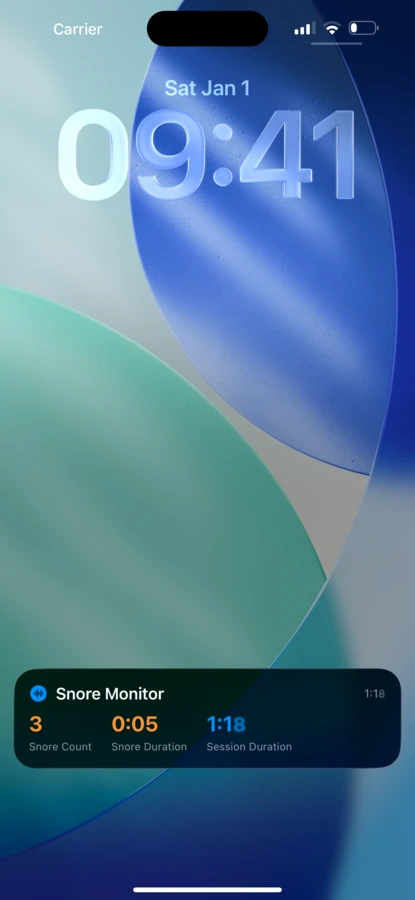
Real-time snore count, duration and session time appear on your lock screen and Dynamic Island all night.
Export detailed session reports — including every individual snore event — to CSV or PDF to share with your doctor.
All audio analysis runs on your device using Apple's DSP frameworks. Zero cloud upload, zero account required.
Onboarding
Monitoring
Sleep Report
Snore Episodes
Other Sounds
Noise Floor
History & Trends
Settings
We designed NightSnore with a simple principle: your sleep audio is deeply personal. It never leaves your device — not even a single byte.
All audio analysis runs locally using Apple's Accelerate framework. No servers, no AI APIs.
Sessions and recordings are stored in your iPhone's local database. Delete anytime from Settings.
Open the app and start. No email, no registration, no tracking.
NightSnore posts a Live Activity to your lock screen the moment monitoring begins. See your real-time snore count, snore duration and session time without unlocking your phone.
On iPhone 14 Pro and later, the Dynamic Island shows a compact indicator so you can check at a glance — no interruption to your sleep.
Download NightSnore and wake up knowing
exactly what happened while you slept.
For iOS 17.6 and later · Requires iPhone · Not intended as a medical device